• Skip to primary navigation
  • Skip to main content
  • Skip to primary sidebar
  • Skip to footer

Alert

Update: Elevator outages, maintenance and upgrades at Central Library More Info

Home - Arlington County Virginia - Logo
MENUMENU
  • Join Now
  • My Account
    • Login
    • My Checkouts
    • My Holds
    • My Lists
    • My Reading History
    • About Borrowing
    • About Holds
    • About My Account
  • Hours & Locations
    • All Hours & Locations
    • Holiday Closings
  • News
    • Library News
    • Director's Blog
    • Get Email Updates
  • Contact Us

Arlington Public Library

MENUMENU
  • Search
  • Collections
  • Library Services
  • Events
  • Community Engagement
  • Join Now
  • My Account
    • Login
    • About Borrowing
    • About Holds
    • About My Account
  • Hours & Locations
    • All Hours & Locations
    • Holiday Closings
  • News
    • Library Blog
    • Get Email Updates
  • Contact Us

CLH News

Remembering September 11 with Photos of First Responders

Post Published: September 9, 2021

The Center for Local History has recently digitized many additional photographs from the Community Archives taken at the Pentagon at the time of September 11, 2001, by Mike Defina, a fire captain with the Metropolitan Washington Airports Authority Fire and Rescue Department.
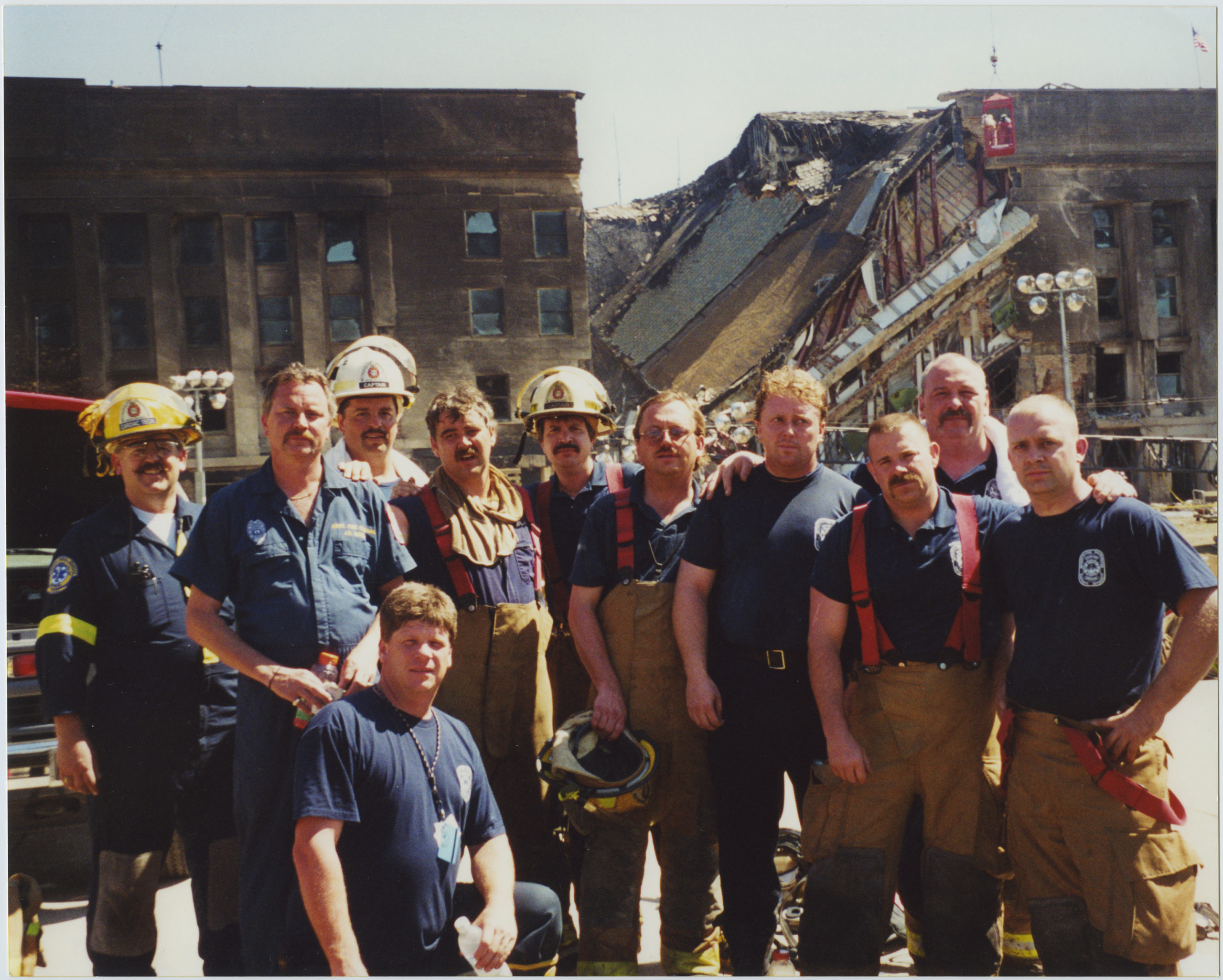
Some of the National Airport personnel prior to being deployed to the Pentagon attack site on the morning of September 12.  From left to right:  CCT Mike Fetsko, Deputy Fire Marshal David Norris, Captain John Durrer, Paramedic Captain David Testa, Captain Mike Defino, Tech. Ralph Cornell, Paramedic Mike Murphy, Tech. Troy Hutchinson, Tech. Paul Purcell, Fire Fighter Delcan Hickey, Fire Fighter Nick Buongiorne (kneeling). 2001, 1 print, col., 8 x 10 in..

National Airport personnel deployed to the Pentagon Sept. 12, 2001. L to R: CCT Mike Fetsko, Deputy Fire Marshal David Norris, Captain John Durrer, Paramedic Captain David Testa, Captain Mike Defino, Tech. Ralph Cornell, Paramedic Mike Murphy, Tech. Troy Hutchinson, Tech. Paul Purcell, Firefighter. Photo: Mike Defina. 

These images are just a few of the Community Archives collection Records Related to the September 11, 2001 Terrorist Attacks on the Pentagon, which is made up of textual materials, photographs, some memorabilia, and audio-visual materials. The bulk of the collection dates from 2001-2002 and features photographs of the aftermath and days after the September 11, 2001 terrorist attack on the Pentagon. (Note: some of these photos may contain sensitive or disturbing material).

That morning a westbound plane took off from Dulles airport, was hijacked by terrorists and crashed into the Pentagon. One hundred and eighty-nine people died in the crash, including the 64 passengers on Flight 77. On the same morning two more hijacked planes were flown into the World Trade Center in New York City, and a fourth hijacked plane crashed in rural Pennsylvania. Nearly 3,000 people died in the tragedy, changing both the country and Arlington forever.

Firefighters and first responders from Arlington County, Fort Myer, and Reagan National Airport were essential in coordinating the Pentagon rescue and response, arriving within minutes of the plane crash.

Arlington County Fire Department took the lead, establishing an Incident Command System across the region to respond to the emergency. Firefighters were able to get the fire under control on the first day, but it took three days to fully extinguish.
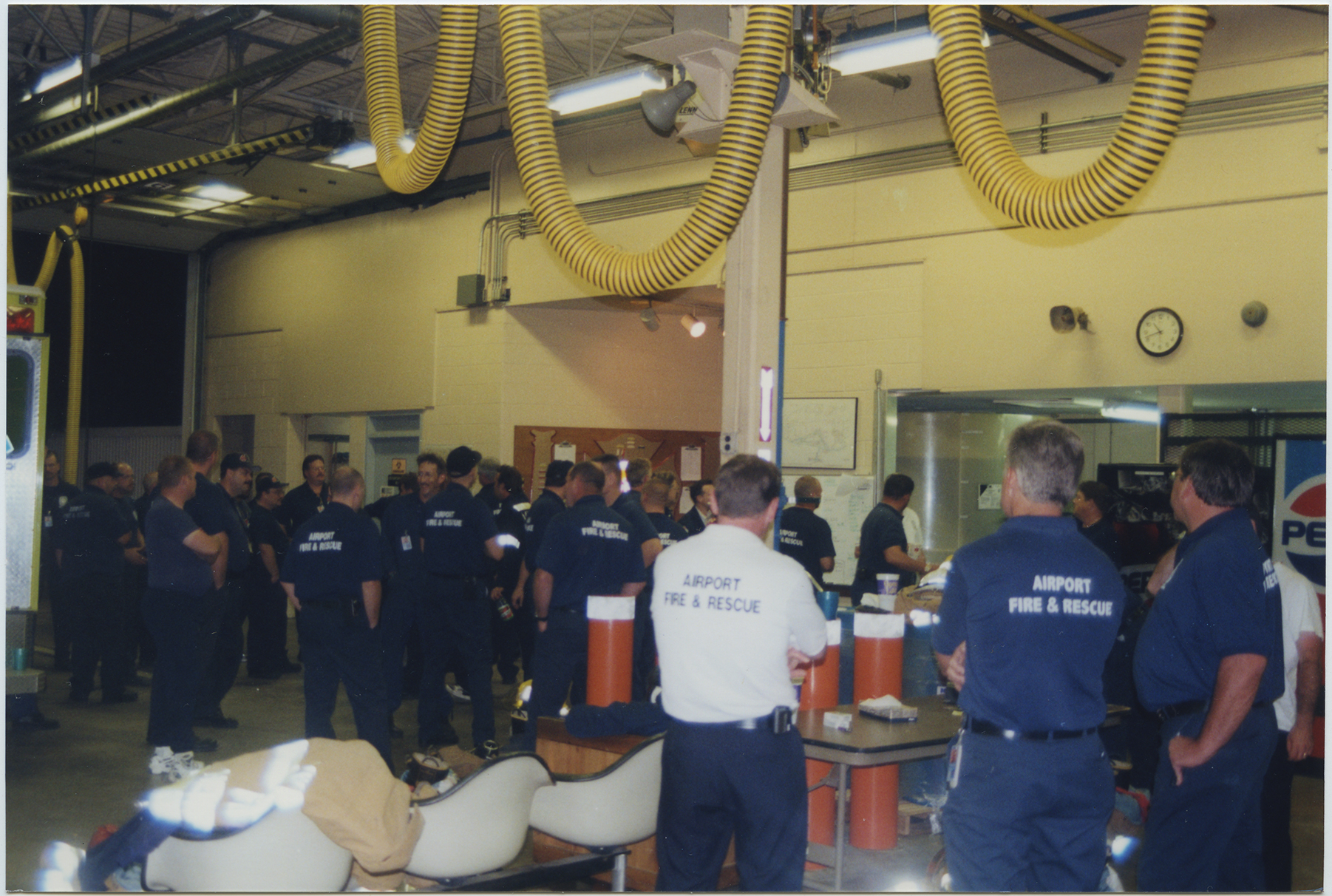
Fire fighters taking a much needed break at the National Airport fire station at 10pm on September 11, after a day long rescue effort at the Pentagon following the attacks. 2001, 1 print, col., 4 x 6 in..

Fire fighters taking a much-needed break at the National Airport fire station at 10 p.m. on September 11, after a daylong rescue effort at the Pentagon. Photo credit: Mike Defina. 

The images in this collection depict both the horrific nature of the crash and Pentagon fires, the resilience and bravery of the first responders, and many spontaneous memorial events.
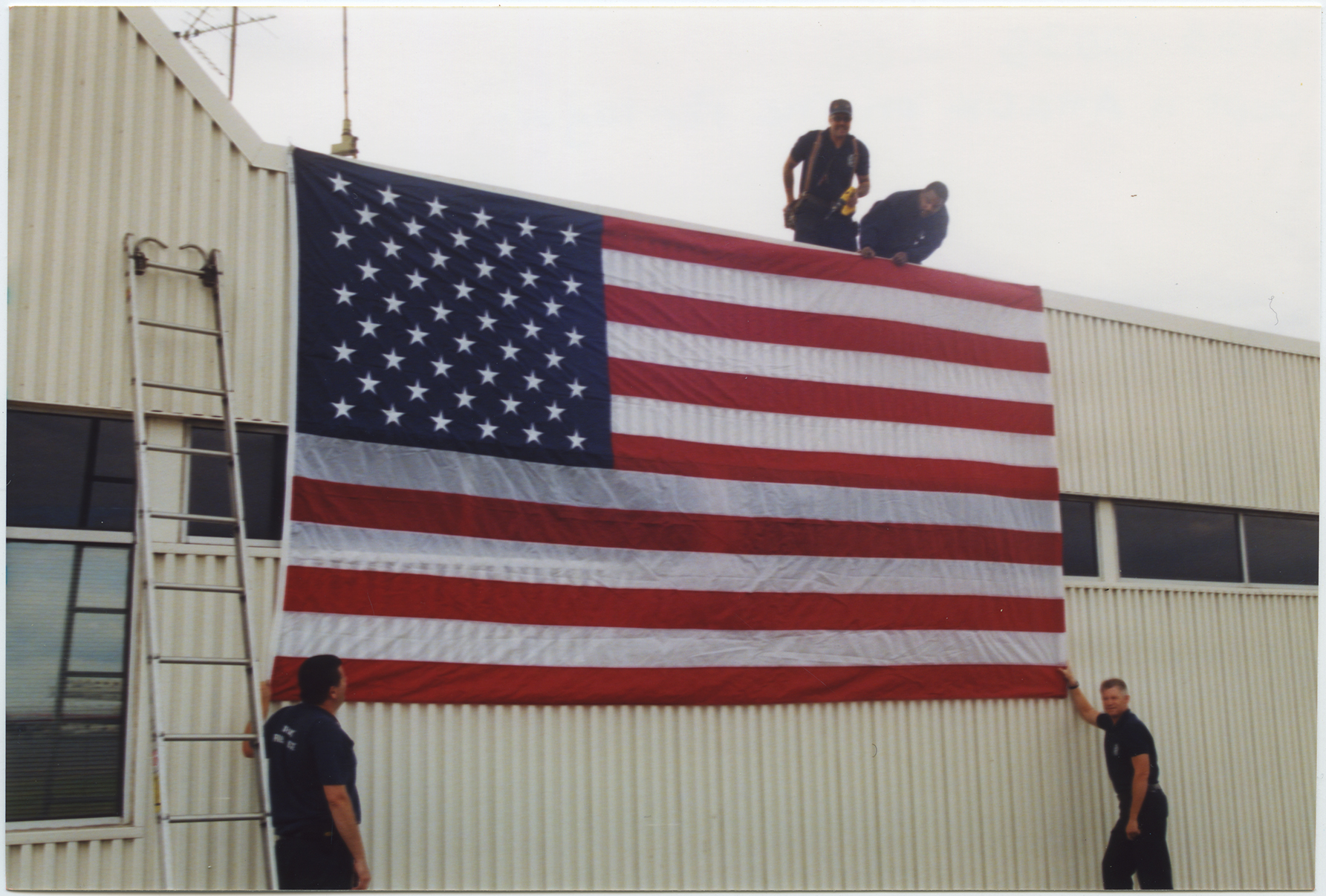
Fire fighters display a large American flag on the front of the National Airport fire station, two days after the 9/11 attack on the Pentagon. 2001, 1 print, col., 4 x 6 in..

Firefighters display a large American flag on the front of the National Airport fire station, two days after the 9/11 attack on the Pentagon. Photo: Mike Defina. 
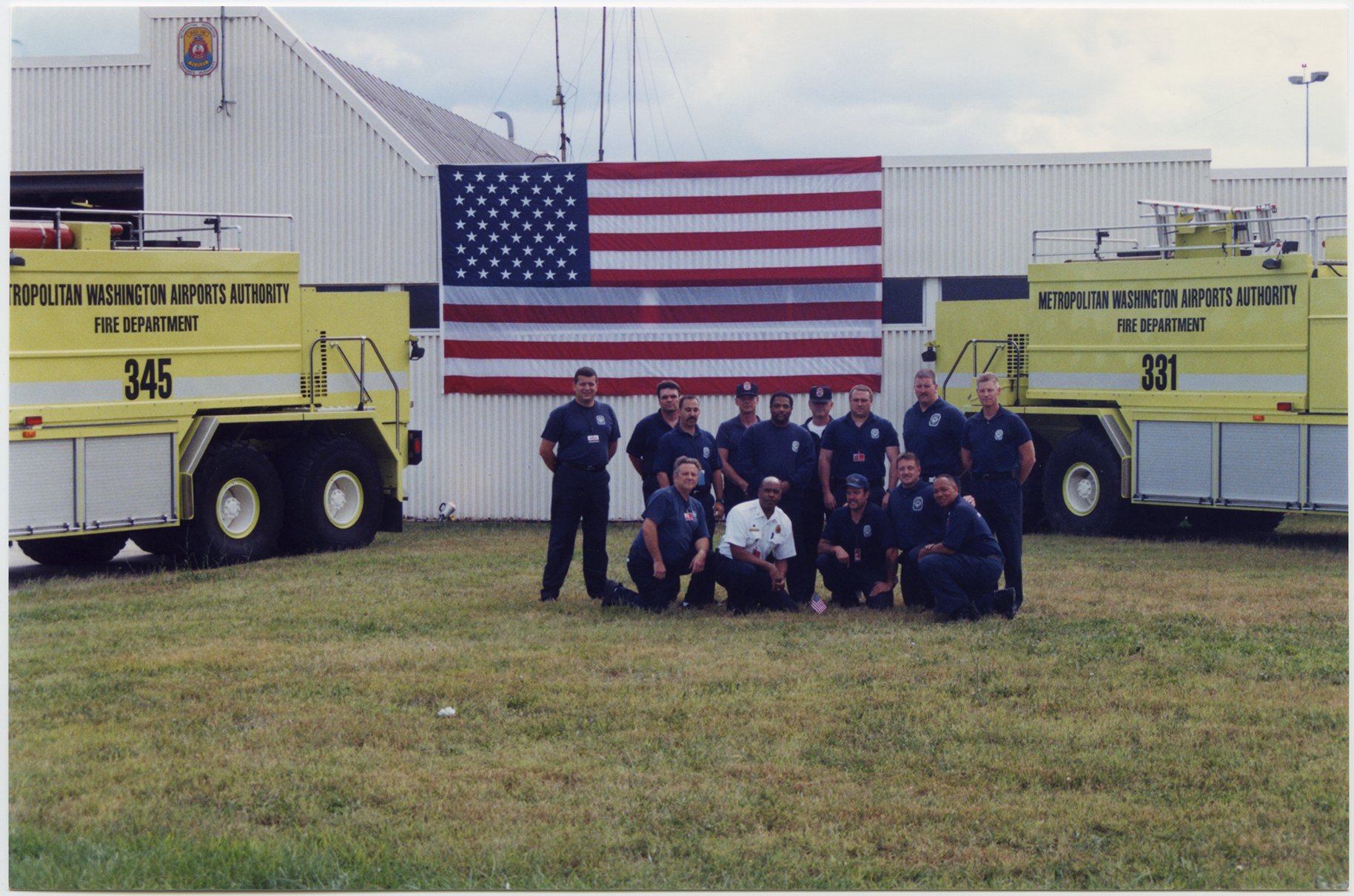
The two foam units, along with their crews, that were on the original call to the Pentagon on September 11, parked in front of the American flag displayed on the front of the National Airport fire station. 2001, 1 print, col., 4 x 6 in..

The two foam units, along with their crews, that were on the original call to the Pentagon on September 11, parked in front of the American flag displayed on the front of the National Airport fire station. Photo: Mike Defina. 
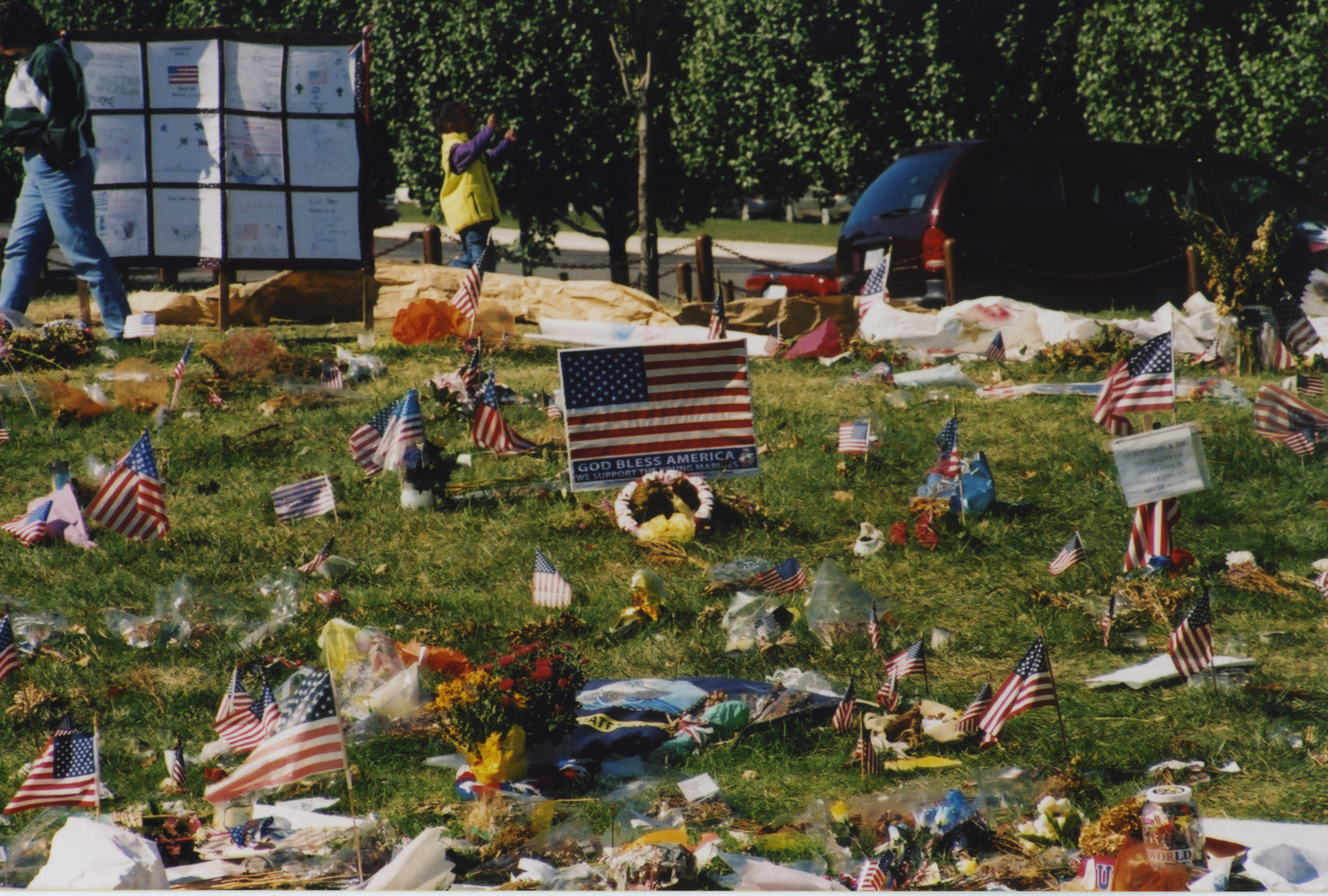
133-125_original_

A memorial of flags, flowers, and signs near the Pentagon following the September 11 terrorist attack. Photo: Mike Defina. 

View All Images

Additional physical materials in the collection are held in the Arlington Community Archives for research use, including many thank-you cards written by school children to the firefighters of the Arlington Fire Department, County Manager Ron Carlee's papers used during the response, after-action reports, ephemera from memorial services, and VHS tape recordings of memorial events.

While these additional items have yet to be digitized, those who wish to research them may use the online finding aid to determine which boxes or folders would be useful and/or contact the Center for Local History to make a research consultation appointment.

Oral histories from the five-year anniversary of September 11, 2001 are also available online in the Center for Local History's digitized Community Archive.
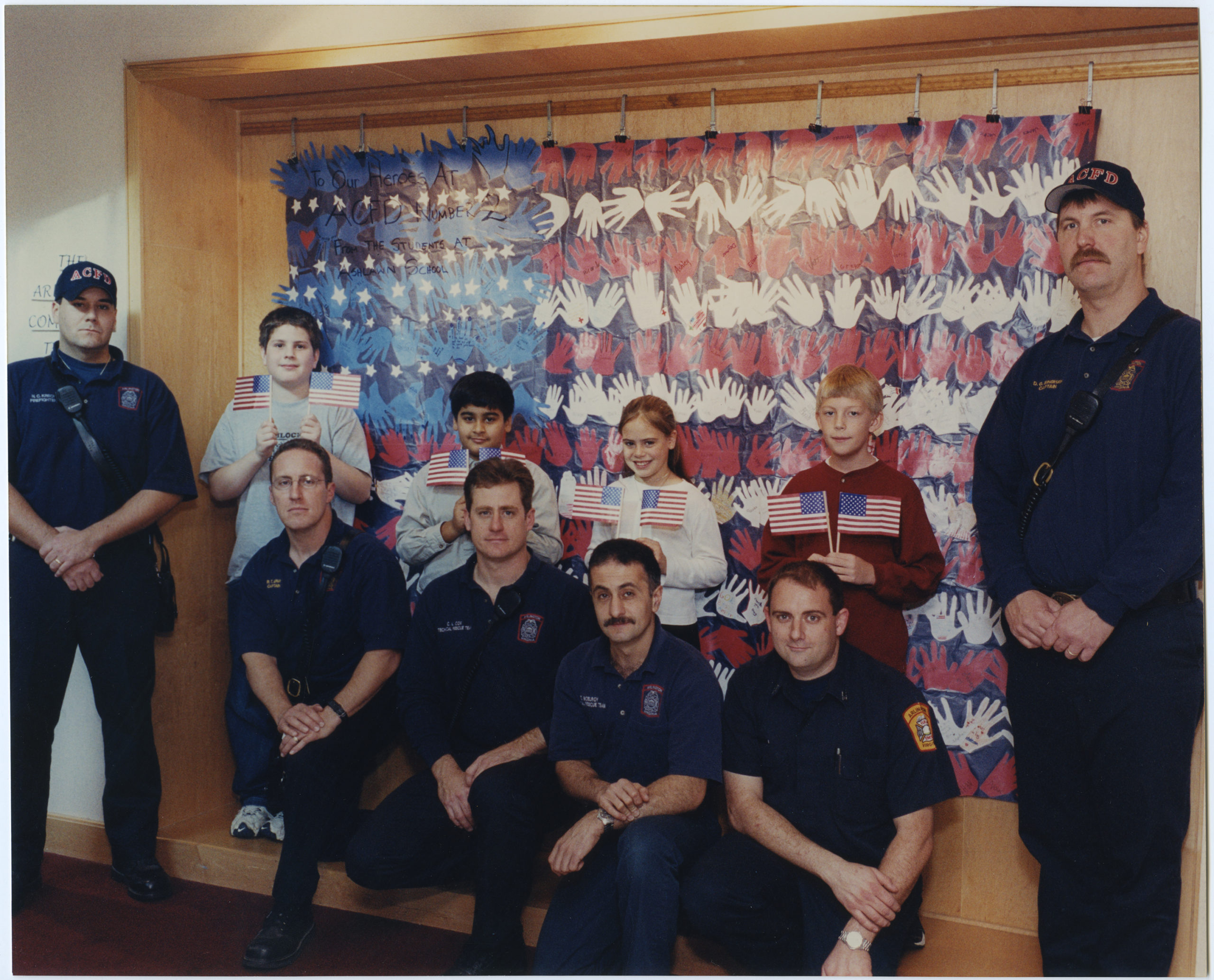
Members of the Arlington County Fire Department posing with children in front of a mural created to thank them for their service.  2001, 1 print, col., 8 x 10 in..

Arlington County Fire Department members pose with children in front of a mural created to thank them for their service. Photo: Mike Defina. 

Do you have Arlington materials related to the events September 11, 2001 that you would like to donate? 

The Center for Local History (CLH) collects, preserves, and shares historical documents that tell the history of Arlington County, its citizens, organizations, businesses, and social issues. Learn about how you can help to build Arlington's community history on the CLH Donation webpage.
September 9, 2021 by Web Editor

Search Thousands of Historic Arlington Papers Online for Free

Post Published: June 21, 2021

Discover Arlington's history and browse newspaper content online from 1935 to 1978.

Chronicle

During the past year, Arlington Public Library’s Center for Local History (CLH) has been working with the Library of Virginia (LVA) to make five decades of Arlington research material available online.

Spanning the years from 1935 to 1978, the materials include historic articles, photos, and news clippings from four Arlington newspapers: the Columbia News, the Daily Sun, the Northern Virginia Sun and the Sun.

Previously, these publications were only available in the Center for Local History as microfilm and digital scans, which were not easily searchable.

These newspapers are a fantastic resource for historians, teachers, genealogists and anyone curious about Arlington's past through the eyes of local journalism.

“Delve deeper into your family history, find information on the transformation and growth of Arlington and discover more of its unique history,” said Arlington Public Library Director Diane Kresh.

The free news archive is 100% keyword searchable by location, date, title and issue and features a clipping feature that allows researchers to save an image or text block of an article.

To access the new source materials, visit the LVA ‘s Virginia Chronicle, which is a large online depository for historic newspapers from across the Commonwealth.


The CLH collects, preserves and shares historical documents that tell the history of Arlington County, its citizens, organizations, businesses and social issues. The CLH operates the Research Room at Central Library and the Community Archives program.

June 21, 2021 by Library Communications Officer

Preservation Week: Preserving Your Family’s Documents

Post Published: April 29, 2020

To celebrate Preservation Week this year, the Center for Local History is offering some tips and resources that will help ensure that your family documents and photographs will be available to future generations!

191022-preservation-week-10-year-anniversary-logo

In 2010 the American Library Association organized the first Preservation Week to highlight the importance of preserving cultural heritage materials, to raise awareness about collecting and preservation, and to provide information and guidance to the general public about preserving family collections.

Here is a guide to preserving your documents and photographs:

Part 1: Physical Documents and Photographs

When you start working on your documents/photos keep in mind the four enemies of paper and photographs:

  • Heat
  • Humidity
  • Light
  • Careless handling by people

Make sure to have a clean, clear space prepared to place the originals before you get them out and do not eat, drink, or smoke around originals.

Papers and Documents

  • Wash hands before handling paper and don’t apply lotion as it can stain paper. Paper can be handled without gloves because clean, lotion-free hands will not stain the paper, and gloves can make it hard to handle delicate paper.
  • It is best to handle important, fragile paper items by their edges
  • Remove paper clips and rubber bands which can cause permanent damage to paper
  • Turn pages carefully, don’t force.
  • Store papers opened and flat rather than folded
  • Separate highly acidic pieces of paper, e.g. newsprint, from other items by sandwiching blank sheets of archival quality paper between them, or if possible, make copies on acid-free paper and throw the clippings away.
  • Store items in protective enclosures such as archival folders or polypropylene film sleeves in acid-free boxes
  • Always store paper records in a cool, dry place, generally not in attics or basements. A temperature of 68 degrees or less and 35%-40% humidity is best. Wide fluctuations in temperature and humidity are the most harmful and to be avoided.
  • Display framed items on interior walls away from sunlight and keep indoor lighting exposure to a minimum. Use UV filtered glazing for frames. Alternately, make copies for display and keep the originals stored away from all exposure to light.
  • Always store paper away from bright light. Damage from light is cumulative and irreversible and can cause fading of inks, yellowing as well as darkening of paper.

Photographs

  • As with paper always wash your hands and don’t use lotion before handling photographs. However, unlike paper, photographs should be handled WITH  Fingerprints can cause permanent stains that may not show up immediately.  If gloves are not available, handle photos by the edge.
  • Store photographs and important documents in a cool, dry place where there is minimal fluctuation in temperature and humidity. Avoid attics and basements. Damp conditions encourage mold and cause photographs to stick together. Hot storage can speed deterioration
  • Temperatures of about 68 degrees and 30% to 40% humidity is fine. Below 15% humidity and photos can become brittle.
  • Store individual photographs and slides in polyester or polypropylene pages or sleeves.
  • When purchasing albums or storage boxes, look for those that are acid-free.
  • Never use an adhesive on your photographs. Use photo corners, polyester mounting strips, or sleeves to mount photographs in albums.
  • Store negatives in a separate location from albums and prints. That way you will ensure that one copy will survive in case of a disaster.
  • Use a soft #2 pencil to label photographs if you must label on the back. For photos with a slick back you can use light blue art pencil such as a “Prismacolor non-photo blue.” DO NOT label with a regular pen.
  • If the photos are encapsulated in a sleeve you can write the information on a piece of acid-free paper and place with the photo. It is very important to label photos so your descendants will know who is who! If you can’t identify someone, try to find a relative who can help.

Part 2: Scanning and Organizing Your Digital Photographs

Planning it Out

Take some time to figure out what you have and what you want to do with your digital images. Everyone’s home collections are different; you know best what you have and what your end goals are. Planning out your home digitization project can help you make decisions about storage and organization of digital images farther down the road.

  • What do you have?
    • What physical materials do you have that you want to scan? How many digital images do you have? And what formats are they all in?
  • What’s your goal?
    • Sharing and displaying – how do you imagine using these images?
    • Storage – you will need enough room to hold all your current digital images with space for future ones. You’ll also want to organize them in a way that you can find them later when you (or someone else) need them.
    • Information – where and when were the photos taken? Who is in them? Images have more value if you know that information.

Doing the Work

For your photos at home, you’ll want to use a flatbed scanner. Do NOT throw those photos away after you scan them! Those originals are the link to your history. Scans are just copies.

Scanning of Physical Media

  • Scan to a format that is well established (nowadays, that is TIFF and JPEG).
  • You will need two copies of every scan – a master and an access copy.
    • The master is your original scan, at a high resolution with great detail. It’s the parent of any access copy you make.
    • Access copy is the smaller copy you can play with. Its easier to send and save. You can play around with this copy: make it black and white, crop it, do effects, etc. If you mess up or need a clean copy for a new project, you can go back to your master and start again.
  • Scan your master and create your access copy with editing software according to the following specs:
    • Prints – 400-600 dpi TIFF files, 16-bit depth, always in color (master); 300-600 dpi JPEG (access copy)
    • Slides (aka Transparencies) – 3000-4000 PPI TIFF files, 16-bit depth (master); 2800 PPI JPEG (access copy)
    • Negatives – 3000-4000 PPI TIFF files, 16-bit depth (master); 2800 PPI JPEG (access copy)

Naming Files

  • Before you start scanning, plan ahead on how you would like to name your scans and how you would like to organize them. How do you look for your photos? How do you organize them in your brain? Your folder organization can reflect that.
  • File names are important. Each image should have its own unique name. However, make sure that the file name for your master and your access copy is the same, maybe with a suffix added, like “access.”
  • When using dates for file or folder names, use the YYYYMMDD format so items will show up in real chronological order.
  • You will want to rename your born-digital files too since the camera or phone does not do a good job initially.
  • You can create a separate list with file names and image descriptions.

Digital Images

  • Photos from your phone are 1-2 MB. A RAW file from your SLR (like a digital negative) can be up to 40 MB (more commonly 20-30), and JPEGS made from that are around 7MB. RAW files can be turned into TIFFs as your master using photo editing software.
  • Access copies should be around 600 PPI JPEGs, which is good for printing but can be a lower resolution for images that will only be shown online.

Storing Your Images

The 3/2/1 Rule

  • You should have three copies of everything (primary copy and two backups), on two different types of media (hard drive and separate storage) and have one backup in a separate location.

Where To Store It All?

  • The Cloud: Cloud storage acts like your hard drive, where you primarily store your images instead of on your computer or laptop. Cloud backup replicates your hard drive, so you are saving everything on your hard drive, but there is a backup copy in the Cloud.
  • Pros: makes your images accessible anywhere, from any device, and makes it easy to share images with other people. Puts the onus of maintenance on the provider – save it and forget it!
  • Cons: some providers take copyright of your images when you upload them into the cloud, can cost money for subscriptions for better service. You have little control – your images are subject to hackers or the whims of the company and the free market.

External Hard Drives

  • External hard drives are under your control and the preferred location for your masters. Make sure you open the drive on a regular basis to make sure everything is working correctly.
  • How much space do I need?
    • 1 TB = 1000 GB
    • 1 GB = 1000 MB
    • If you have scanned physical photos and/or images from a digital SLR camera, a 1 TB drive may be a good option, giving you some room to grow.
    • At the very least, put your masters on an external hard drive!!

WHERE TO BUY PRESERVATION SUPPLIES:

Hollinger Metal Edge
9401 Northeast Dr.
Fredericksburg, VA 22408
www.hollingermetaledge.com
800-634-0491

Gaylord Bros
P.O. Box 4901
Syracuse, NY 13221-4901
www.gaylord.com
800-962-9580

University Products Inc.
517 Main Street
Holyoke, MA 01040
www.universityproducts.com
800-628-1912

April 29, 2020 by Web Editor

COVID-19 Archives Project: Call for Donations

Post Published: April 28, 2020

April 28, 2020 by Web Editor

Exploring the Story of Desegregation in Arlington Public Schools

Post Published: February 2, 2017

"Project DAPS"

The richly documented story of public school desegregation in Virginia will be made accessible online by the County that led the way.

On Saturday, Feb. 25, in conjunction with the 2017 Feel the Heritage Festival, Arlington Public Library launches Projectdaps.org, a unique online exhibition and searchable database – built from thousands of photos, documents and recordings – surrounding the legal and moral battles that culminated with four courageous African American students taking their seats on Feb. 2, 1959 at Arlington’s Stratford Junior High School.

black and white photograph of black students entering Stratford Junior High in 1959

Ronald Deskins, Michael Jones, Lance Newman, and Gloria Thompson walked into Stratford Junior High School on February 2, 1959. Center for Local History, Arlington Public Library


“Project DAPS” (Desegregation of Arlington Public Schools) is culled from the holdings of the Library’s Community Archives in the Center for Local History (CLH) at Central Library.

The project explores the historic narrative starting with early integration efforts amid Arlington’s rapid growth of the 1940s. Many items were recently digitized for the first time.

In 2016, the Stratford school property was declared a local historic district. Library Director Diane Kresh says the timing was perfect for creating a “complementary and comprehensive digital collection to tell the story of this signal milestone in our rich community history.”

Because there are always more layers of history to find and examine, the CLH continually seeks community donations and oral histories, particularly as they relate to desegregation following the historic day at Stratford. To contribute, contact the CLH at 703-228-5966 or localhistory@arlingtonva.us.

This digital access project was completed using new FY2017 funding in the Department of Libraries budget dedicated to increasing public access to government records and archival materials.

The Center for Local History at Arlington Public Library is committed to collecting, preserving, and sharing the history of Arlington County. 


February 2, 2017 by Web Editor Tagged With: local history news

Public Shoe Store Donates Records to Center for Local History

Post Published: February 29, 2016

Farewell to an Arlington Landmark, 1938-2016

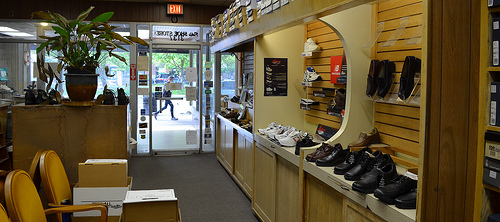
shoes in a shoe store

The Public Shoe Store in Clarendon, one of the oldest long-term businesses in Arlington, closed its doors on February 27.

S. H. “Doc” Friedman, the store’s owner and a podiatrist by training, has finally decided to retire after 78 years in the business [Arlnow.com]. Specializing in comfort shoes and custom fitting, it is one of the rare specialty stores of its kind left in the area and will certainly be missed by its many long-time customers.

“Doc” Friedman is donating the records of the Public Shoe Store, as well as the sign from the front of the store, to the Center for Local History at the Arlington Public Library.

In doing so, he is making sure that the Public Shoe Store’s place in the history of the community is preserved.

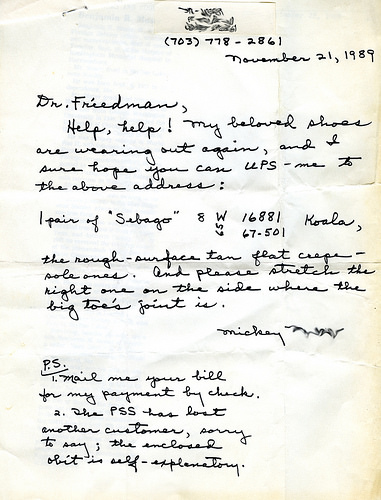
handwritten letter requesting shoes
Letter to 'Doc" Friedman from a loyal customer (click to enlarge)

Did you know that the Center for Local History collects historical business records as well as the records of Arlington organizations?

These records help tell the story of the development of the community and provide unique testimony to the achievements of your business or organization. Placing these records in an archival repository helps assure that they will be preserved and become part of the community’s collective memory.

If you have business or organizational records you would like to donate, please contact the Center for Local History at 703-228-5966, or email localhistory@arlingtonva.us.


February 29, 2016 by Web Editor Tagged With: local history news

Celebrate Black History: Hall’s Hill +150

Post Published: February 1, 2016

This year marks the 150th anniversary of the notable Hall’s Hill/High View Park neighborhood in north Arlington.

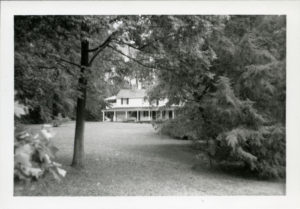
Bazil Hall home behind trees

Bazil Hall home, 1700 N. George Mason Dr., c. 1866

The name Hall’s Hill comes from Bazil Hall, an Alexandria (now Arlington) County farm owner in antebellum Northern Virginia.  Following the difficult Civil War years, Hall gradually broke up and sold his estate, including its noted rise, in small parcels to freed slaves, generally for $10-15 per acre.

Hall, according to a 1969 interview with Robert Nickerson, urged blacks to buy as much land as they could, saying a time would come when they would no longer be allowed to acquire such property. In Nickerson's words: "[H]e told the truth.”  In the 1890s, before enforced segregation kicked in, the lots were also advertised in the Washington Bee, the region's black newspaper.

In the early days of the Hall's Hill community, most residents had gardens and often raised chickens and hogs. In oral histories, they fondly described a life built around church, community and social activities. Block parties, sledding and the neighborhood baseball team, known as the Virginia White Sox, were just some of the pastimes.

"The Hill" is remembered as a place where you knew everyone and everyone knew you, and children understood that if they misbehaved in front of neighbors, their parents would soon hear of it.  A close-knit community, the people of Hall's Hill looked out for one another.

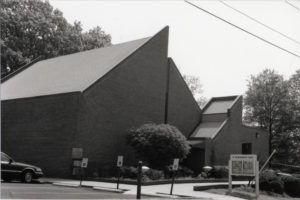
Mount Salvation Baptist Church

Mount Salvation Baptist Church

Bounded by Lee Highway (north), Glebe Road (east), North 17th Street (south) and George Mason Drive (west),  residents established many of their own stores, schools and houses of worship.  The churches in particular remain an ongoing source for social, cultural and religious enrichment.

Until the 1950s the neighborhood was separated from the adjacent white community by an 8-foot-high fence that ran between the backyards of blacks and whites.  Only a small part of the fence remains today. It can be seen from N. 17th Street.

Members of the community played  significant roles in the national and local Civil Rights movement of the 1950s and 60s, working to desegregate public schools, housing, theaters, hospitals, libraries and eating facilities.

Calloway Methodist Church

Calloway Methodist Church

Arlington County officially changed the neighborhood's name to High View Park in 1965. However, many long-time residents still prefer to call the area by its original name.

Today an aging population and changing demographics place the community on the brink of significant change, but as long as the stories of residents are collected, preserved, and celebrated, its history and significant contributions will be not be lost.

From an oral history with Welbe “Peggy” Earline Deskins done in 2003:

“I think it’s always important to… remember your roots and to remember where you started from… the why and how of everything.  I think that helps in your later life and it certainly helps other people as they’re coming along.

If you lose it all, [there] comes the time when there’s a whole race who just knows nothing.... You might have to even start out from the beginning, but when you do, if you have some references, then you know what to start with.

I think you should always... keep track of history... people were different in that time.  People helped each other a lot more.  People were a lot more open with each other, you know.  I mean you could run next door and get a cup of sugar you know...  it was just different.  And those are the kinds of things I think that help people to keep going and to prosper.”

February 1, 2016 by Web Editor Tagged With: local history news

Grant Helps Preserve Memories of “Little Saigon”

Post Published: January 7, 2016

The rich cultural history of Arlington’s “Little Saigon” community will be told through a new guide produced with a $9,000 grant from the Virginia Foundation for the Humanities.

January 7, 2016 by Web Editor Tagged With: local history news

Roadmap for Preserving, Sharing Arlington’s Past

Post Published: December 16, 2015

The County’s History Task Force—charged with creating a vision capturing, preserving and sharing online Arlington’s history – has made its final recommendations to the County Manager.

December 16, 2015 by Web Editor Tagged With: local history news

Don’t Let Old Yearbooks Clutter Your Closets…

Post Published: January 2, 2012

Sandra Bullock and Shirley MacLaine were both cheerleaders, and Warren Beatty played football at Washington-Lee.

Katie Couric was a cheerleader at Yorktown.

Want to see their high school photos? The Virginia Room’s archive contains copies of many Arlington high school yearbooks–but not all of them.

Help us complete our archive – if you have an Arlington high school yearbook from any year between 1951 and 2010, consider donating it to the Virginia Room.

We’re looking for yearbooks in good condition (no mold or mildew please), but we don’t care if they include inscriptions. We also accept duplicates.

Walk-in donations are happily accepted. For more information, call 703-228-5965 or email staff.

January 2, 2012 by Web Editor

  • « Go to Previous Page
  • Page 1
  • Page 2
  • Page 3
  • Go to Next Page »

Primary Sidebar

News

Photo of Rev. Jesse Jackson (second from the right) speaking at a press conference, 1979, Library of Congress, Prints and Photographs Division, LC-U9-37985- 14, photograph by Marion S. Trikosko

Remembering Civil Rights Icon, The Rev. Jesse Louis Jackson

Civil rights icon Rev. Jesse Louis Jackson … ... about Remembering Civil Rights Icon, The Rev. Jesse Louis Jackson

Read More News
See More Service Updates

Center for Local History

Photo of President Lyndon B. Johnson shaking hands with Martin Luther King, Jr., at the signing of the Voting Rights Act of 1965. Photograph by Yoichi Okamoto. Courtesy of the Lyndon B. Johnson Library.

The Voting Rights Act of 1965: Remarks by Rev. Dr. DeLishia A. Davis

NAACP Arlington Branch president and pastor Dr. … ... about The Voting Rights Act of 1965: Remarks by Rev. Dr. DeLishia A. Davis

Read More Local History

Director’s Blog

The President's House, Philadelphia, PA.

Director’s Message: Black History Month

Feb. 11, 2026, Correction: In the previous … ... about Director’s Message: Black History Month

More Director's Blog

Footer

About Us

  • Mission & Vision
  • Charlie Clark Center for Local History
  • News Room
  • Get Email Updates

Administration

  • Policies
  • Library Staff
  • Job Opportunities
  • Propose a Program or Partnership

Support Your Library

  • Friends of the Library
  • Giving Opportunities
  • Donating Materials
  • Volunteer Opportunities

Our Mission

We champion the power of stories, information and ideas.

We create space for culture and connection.

We embrace inclusion and diverse points of view.


Download the Library App

Download the Library App

Arlington County | Terms & Conditions | Accessibility | Site Map
· Copyright © 2026 Arlington County Government ·